
TL;DR
On a normal Windows network, your own computer gives away credentials without you doing anything at all. When it cannot find something by name, it stops asking the official address book and instead shouts the question at the entire local network, and it trusts whoever answers first. An attacker just has to sit there and answer « that’s me » to everything. Your machine then tries to log in to them and hands over a scrambled proof of your password, no click and no warning involved.

That scrambled proof is an NTLMv2 response, and the nasty part is that it cracks fast, far faster than the Wi-Fi handshakes in the earlier episodes. A weak company password can fall in minutes on a decent graphics card. I build this into the Evil-M5Project because when an admin watches a credential land and crack in under a minute, purely from ordinary office chatter, the fixes stop being a backlog item and get flipped that same afternoon.
The question your laptop asks out loud
You try to open a shared folder at work, something like \\fileserver\reports, but you fumble the name, or the server got renamed last month and nobody told your laptop. Nothing dramatic happens. You get an error, you shrug, you retype the path, and you move on with your morning. As far as you can tell, a drive was briefly flaky.

What you do not see is that in the half-second before that error, your Windows machine turned to the whole local network and asked, out loud, « does anyone here know who fileserver is? » And if the wrong person was listening and answered, your laptop may have just tried to log in to them, handing over a scrambled proof of your password without ever asking you first. That is the opening for Responder-style attacks, one of the most reliable ways to pick up credentials on a company network, with no exploit and nothing to click. Just a computer being far too helpful to a stranger. Let me walk you through how Windows ends up doing this, what an attacker walks away with, and how to stop your machines volunteering.
How Windows finds things on a network
When your computer needs to reach something by name, a file server, a printer, a website, it normally asks DNS, the network’s official address book, and most of the time that is the end of it. But Windows has a long-standing habit that was meant to be helpful: if DNS comes back empty, it does not give up and show you an error straight away. Instead it falls back to shouting the same question at every device on the local network, using two old protocols called LLMNR and NBT-NS. The names do not matter, the behaviour does, and the behaviour is « hey everyone, does anyone know who fileserver is? »

There is a second helpful habit worth knowing about, called WPAD, or Web Proxy Auto-Discovery. A proxy is a middleman that your web traffic can be routed through, and to save IT the trouble of configuring one by hand on every machine, Windows can try to find its proxy settings on its own by asking the network for a little config file. Both of these mechanisms were designed for small, friendly office networks where everyone on the wire was trusted, and both share the same fatal manners: they will believe whoever answers first. On a modern network, where the person at the next desk might be a contractor, a guest, or a planted device, that politeness is the whole vulnerability.
The attack: just say yes
Responder is the classic tool for this, and Evil-M5Project has its own version built in. The idea is almost insultingly simple: when a machine on the network shouts « who is fileserver? », the attacker’s device simply answers « that’s me, » before the real one can or when no real one exists at all. The victim’s computer, perfectly satisfied with that answer, tries to connect to the attacker over SMB, the Windows system for sharing files and printers.

And because the victim’s machine believes it is reaching a normal, trusted company resource, Windows does the thing it does automatically all day long: it offers to log in on your behalf, and sends what is called an NTLMv2 response. That response is the entire prize. The attacker’s device writes it to a file and moves on to the next one, while on your end the only thing that happened was a folder that did not open. You were never prompted, you never typed anything, and nothing looked wrong, which is exactly why this works so quietly and so often.
WPAD, the even lazier version
The WPAD variant leans on that proxy-discovery habit and manages to be even less work for the attacker. The Evil device stands up a small network with its own DNS and its own web server, and when a Windows machine asks for its proxy configuration, a file called wpad.dat, the web server answers, but first it demands a login before it will hand the file over. Windows, trusting the request because asking for proxy config is a completely routine thing, logs in automatically, and there is the NTLMv2 response again, this time without the victim browsing to anything at all.

It gets worse, because it is not only the browser that does this. Chatty background apps like Outlook and Teams reach for proxy settings the same way, so they leak a response on their own schedule even if nobody opens a web page. And it pairs naturally with the rogue DHCP trick from earlier in this series, which can point every computer on the network straight at the attacker’s malicious proxy config, turning a passive trap into one that actively herds the whole office toward it.
Technical deep dive: LLMNR, the NTLMv2 response, and why it cracks fast
This is the part worth slowing down on, and you can skim it if you only want the defenses. The attack chains three old pieces, and seeing how they fit is what makes the fixes obvious. First, name resolution: LLMNR (UDP port 5355) and NBT-NS (UDP port 137) are the two broadcast fallbacks Windows uses when DNS fails, and because a broadcast goes to everyone, any device on the segment can answer a query meant for the real server. The attacker answers all of them.
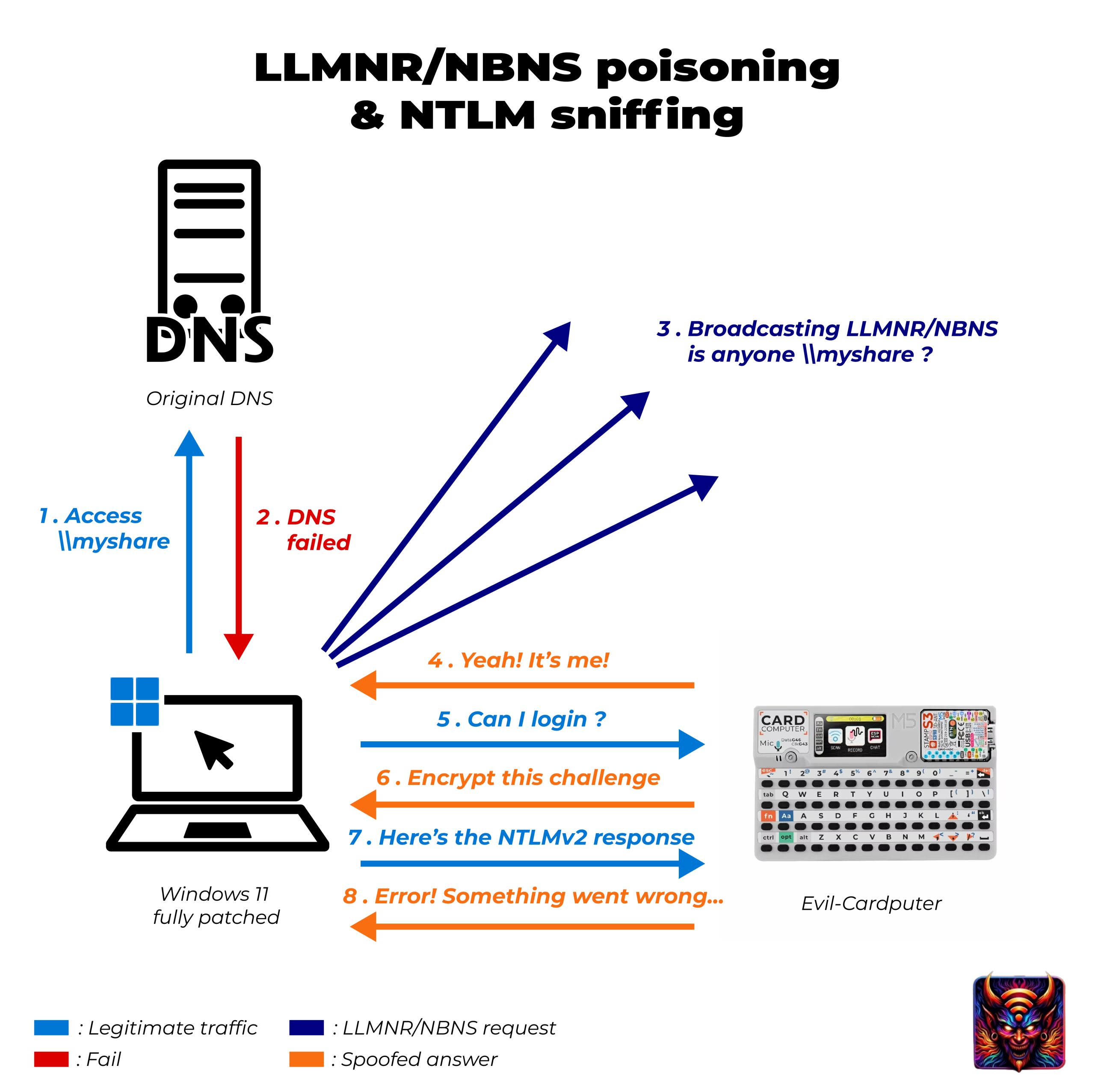
Second, the authentication. Once your machine connects to the attacker over SMB, it runs NTLM authentication, a challenge-response dance. The attacker’s server sends a random challenge, and your machine computes a response from the challenge and a value derived from your password, then sends that back. The crucial thing is what that response is and is not: it is not your password, and it is not a reversible copy of it. It is a proof that you know the password, the exact same shape as the Wi-Fi handshake in the deauth episode, something an attacker can take home and test guesses against offline, with no server in the loop to slow them down or lock them out.
Third, and this is the part that should make you sit up, the speed. A WPA Wi-Fi handshake is deliberately slow to crack because it runs each guess through thousands of rounds of hashing. NTLMv2 does nothing of the kind: it is built on a cheap, fast calculation, so a modern graphics card can test billions of guesses a second against a captured response. A weak or middling company password, especially the predictable « Spring2024! » kind that technically satisfies most password policies, often falls in minutes rather than years. Same challenge-response idea as Wi-Fi, wildly different economics, and the difference is entirely why this attack is so feared on corporate networks. There is also a technique called relaying that uses the response live, forwarding it straight onto another machine without ever cracking it, but that is a story for a later episode.
What they do with the response
A captured NTLMv2 response goes straight into offline cracking, and because of that cheap fast calculation, the attacker does not need much patience. They load the file into hashcat on a graphics card and let it run through a wordlist, and the predictable passwords, a season and a year, a company name and a number, a child’s name and an exclamation mark, surface almost immediately because they sit at the top of every list ever assembled.

Crack it and the attacker is no longer holding a scrambled proof, they are holding a real employee’s username and password, which on a normal Windows network is a long way in. They can log in as that person, reach what that person can reach, and start quietly mapping the rest of the organisation from a legitimate-looking account. The whole chain, from a laptop failing to find a file to a stranger logged in as a real user, can run start to finish in the time it takes to get a coffee, and none of it required a single exploit.
Who’s already doing this
This is one of the first things many penetration testers do the moment they get onto a client’s network: plug in, switch Responder on, and go and get that coffee. Credentials usually start landing within minutes, entirely from normal Windows chatter, which is both the point of the demo and the uncomfortable truth it reveals. Nothing was hacked in the dramatic sense. The network simply answered the questions it was asked, to the first device that answered back.

The same move works for anyone who has gained a foothold on a corporate network, whatever that foothold is: a rogue device left in a meeting room, a laptop that got compromised by something else, or a visitor on guest Wi-Fi that was never properly walled off from the corporate segment. It is quiet, it is automatic, and on a default Windows network it almost always produces something worth having, which is exactly why it has stayed a first move for so long.
A slow morning for Tom
Say you are Tom, an accountant, and you are having a slow morning because a mapped drive keeps throwing errors after last week’s server migration. Every time an app reaches for the old \\finance-01 share that no longer exists under that name, your laptop quietly asks the network where to find it, and every single time, a small device sitting under a desk down the hall answers « over here. » Your laptop, only trying to be helpful, authenticates to it, and your NTLMv2 response drops into a file you will never see.

You never typed a password and no window ever popped up. All you got was a mildly annoying morning with a drive that would not behave, the kind of thing you mention to IT and then forget. By lunch, « Finance2023! » has been cracked off that response in less time than your coffee break, and someone is reading the books logged in with your name on the account. The distance between how trivial it felt and how completely it worked is the entire reason this attack deserves respect.
How to protect yourself
The reassuring part is that nearly every fix here is a switch an administrator can flip, and together they take this attack almost entirely off the table. The weight is on the network side, with one genuinely important job left for everyone.
If you run the network (mostly an admin job)
- Turn off LLMNR and NBT-NS. LLMNR switches off with a single group policy, the Windows feature admins use to push one setting to every machine at once. NBT-NS is a little more work, set per network adapter through a script, the registry, or a DHCP option, but it can still be done across the whole fleet. Turning both off removes the main way Responder ever gets a reply in the first place.
- Turn off WPAD if you do not use it, and do not leave « automatically detect proxy settings » enabled on clients, so machines stop volunteering a login to any server that asks for proxy config.
- Enforce SMB signing. It blocks the most common form of relaying, where a captured response is replayed straight onto another machine’s file sharing with no cracking at all. Closing relaying off completely also means extra hardening on the other servers that accept logins.
- Push genuinely strong passwords and move toward longer passphrases. A captured response is only dangerous if it cracks, and length is the single thing that keeps it from cracking on even a fast rig.
- Segment the network and isolate guests, so a rogue device cannot simply sit there hearing the whole office’s chatter and answering all of it.
- Watch for it. One host answering every LLMNR and NBT-NS query, or machines suddenly authenticating to an unknown device, is exactly the pattern to alarm on.
If you are just a user
- Use a long, unique password. That part is genuinely in your hands: even when your response gets grabbed, length is what means it never turns back into your account. The protocols themselves are IT’s job, but the password is yours.
- Be wary of a login box that appears out of nowhere, especially one asking for your Windows or email password when you did not start a login yourself.
Doing it with the Evil-M5Project
The point of the demo is to show an admin just how much a default Windows network gives away entirely on its own. Evil-M5Project, the firmware I build, runs it on an M5Cardputer against a lab you control, and I will usually reach for one of three pieces depending on what I want to show.

- The Responder module answers the LLMNR and NBT-NS lookups, takes the SMB connection, issues the challenge, and drops each response it catches into a file on the SD card, already in the format hashcat expects. A little radar animation shows requests arriving and names the last user and domain it caught, which tends to be the moment the lesson lands in the room.
- The WPAD Abuse module starts a network with a fake DNS and web server and serves the malicious wpad.dat, catching responses from the computers and apps that follow proxy auto-discovery. The firmware’s own tip is to pair it with rogue DHCP, which can advertise the proxy to clients directly.
- Crack NTLMv2 cracks captured responses on the Cardputer itself, streaming a wordlist from the SD card. Be clear on what that is, though: a microcontroller tests a few thousand guesses a second, nowhere near the billions a real graphics card manages, so this is a « look, a weak one falls » demonstration. Serious cracking happens offline on a proper rig.
The honest limits keep it grounded. You have to be on the local network, because this is not a remote attack. Some responses carry no real username because the connection authenticated anonymously, so there is nothing to tie them to and nothing to crack, and the tool filters those out. Firefox does not auto-discover a proxy unless you tell it to, so it does not leak through WPAD by default, and plenty of networks have already switched off LLMNR, in which case Responder simply hears nothing at all, which for a defender is precisely the goal.
Evil-M5Project is for ethical and educational use only. Only run Responder, WPAD abuse, or cracking against networks you own or are explicitly authorized to test, and follow the laws where you are.
Firmware and docs: https://github.com/7h30th3r0n3/Evil-M5Project.
Your computer answers for you
The unsettling thing about Responder is not clever code, it is that your own machines do the talking. They ask the network questions all day and trust whoever replies, so a single quiet device can sit in a corner pulling real credentials out of ordinary office noise, and the first sign anyone gets is usually a cracked account showing up somewhere it should not. The attack is patient, silent, and built on good manners that stopped being safe decades ago.

The fixes are well understood and nearly all of them are switches an admin can flip: kill the legacy name fallbacks, turn off the WPAD you do not use, sign your SMB, and make passwords long enough that a grabbed response dies on the wordlist. I build the Responder and cracking modules into Evil-M5Project for one reason, and it is a practical one: when an admin watches a response land and crack in under a minute, those switches usually get flipped that very afternoon, which is the whole point of showing them.
Laisser un commentaire
Vous devez vous connecter pour publier un commentaire.